
Skip to content

Book a free consultation today!

Quanlyx
All projects
Healthcare / Project spotlight

Healthcare CRM

Patient relationship management platform for hospitals, clinics, and care teams.

Patient CRMReferralsCare Teams
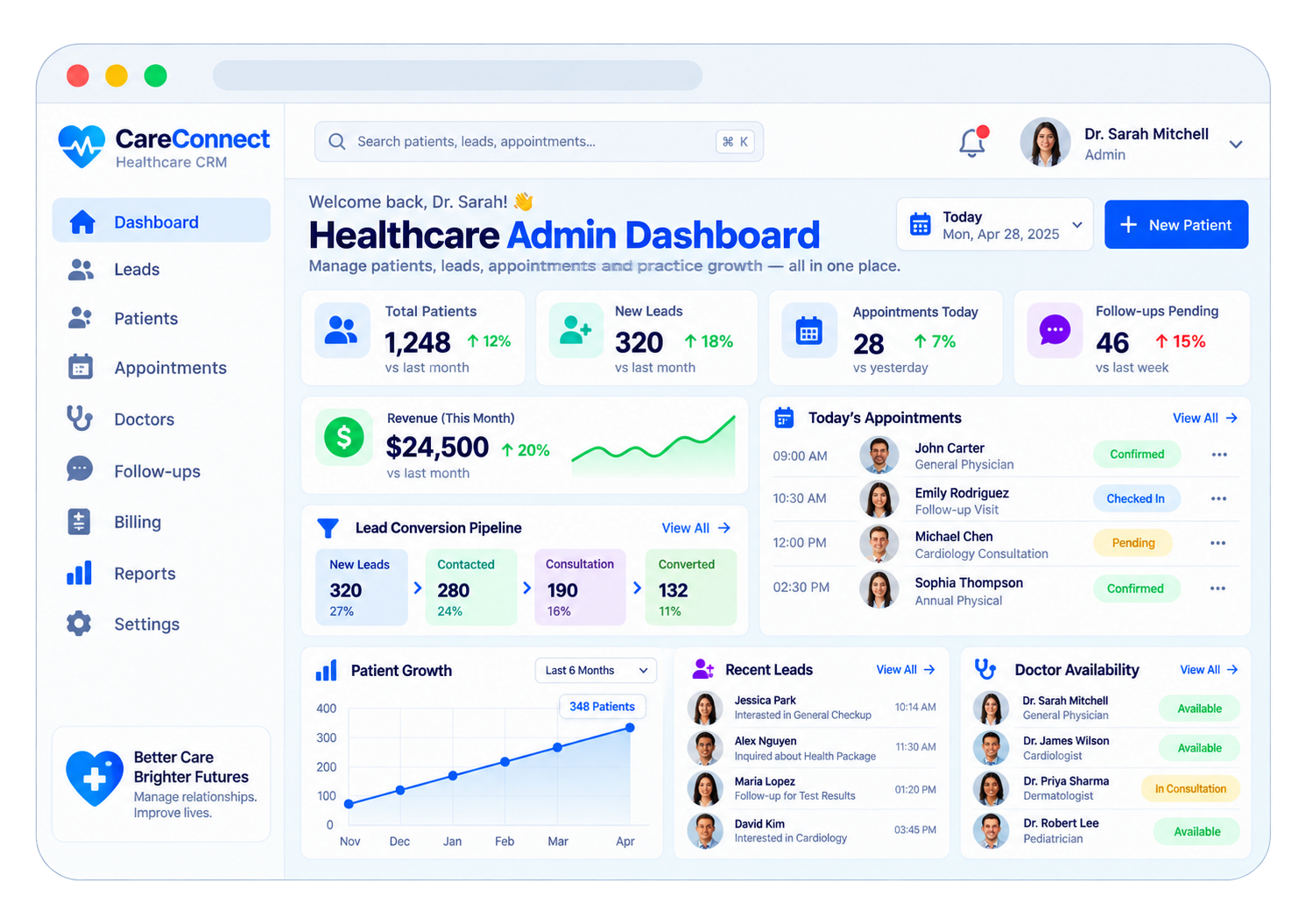
Healthcare CRM: Patient relationships interface illustration
Patient relationshipsIllustrative preview

01 / Product walkthrough

Patient relationships, explained in detail.

Healthcare CRM centralises patient profiles, referrals, follow-ups, and provider communication so care teams can build stronger patient relationships across every touchpoint.

Explore the workspaces, everyday actions, and reporting behind this solution. Each module below explains what your team can manage and how the work connects.

02 / Features & functionality

Inside each module

6 modules ? Detailed walkthrough
01Module guide

Patient enquiries & lead conversion

The lead pipeline shown in the preview follows healthcare enquiries from first contact to a booked consultation and an established patient relationship. Coordinators can see who needs a response and which enquiries have progressed.

  • Enquiry capture. Record the person's contact information, referral source, service interest, and preferred contact time.

  • Coordinator ownership. Assign a staff member to follow the enquiry, keep conversation notes, and schedule the next contact.

  • Conversion visibility. Compare the number of enquiries entering each stage and identify where patients need further assistance.

Stages explained

  1. 1
    New lead

    A patient enquiry or referral is recorded.

  2. 2
    Contacted

    A coordinator discusses the enquiry and next steps.

  3. 3
    Consultation

    A consultation is arranged with the relevant provider.

  4. 4
    Converted

    The enquiry becomes an ongoing patient relationship.

02Module guide

Patient relationship management

The Patients workspace connects contact information, previous enquiries, appointment history, and ongoing communication. Care coordinators can understand the existing relationship before responding to a patient.

  • Patient profile. Maintain contact details, referral information, communication preferences, and the staff member responsible for follow-up.

  • Relationship timeline. Keep previous calls, appointments, enquiries, and care-coordination notes in a single chronological view.

  • Team handover. Share relevant context with authorised colleagues when a patient moves between departments or coordinators.

03Module guide

Appointments & doctor availability

The appointment list and doctor-availability panel connect patient requests with the provider schedule. Teams can review today's bookings and distinguish pending appointments from confirmed or checked-in visits.

  • Provider matching. Select a suitable department or doctor based on the requested service and available schedule.

  • Booking status. Keep pending, confirmed, checked-in, completed, and cancelled appointments distinguishable for reception staff.

  • Availability changes. Review doctors who are available or in consultation before arranging or changing an appointment.

04Module guide

Follow-ups & patient support

The Follow-ups workspace keeps outstanding conversations and patient requests visible after the first contact or appointment. Each item has a responsible coordinator and a planned next action.

  • Follow-up scheduling. Record the reason for contact, due date, responsible person, and preferred communication channel.

  • Patient assistance. Track appointment questions, service enquiries, and requests requiring another department's response.

  • Pending work. Separate completed conversations from overdue or unresolved items so managers can help the team prioritise.

05Module guide

Practice dashboard & growth reports

The dashboard summarises patients, new leads, appointments, pending follow-ups, and revenue. Growth charts and conversion reports help practice managers understand how enquiries translate into patient relationships.

  • Daily overview. See today's appointment workload and pending follow-ups alongside new enquiry activity.

  • Growth trends. Compare patient growth and revenue over selected periods to understand changes in practice activity.

  • Lead-source performance. Review referral and enquiry sources alongside conversion stages to identify which channels bring relevant demand.

06Module guide

Billing & practice administration

Billing and Settings connect the patient relationship with its administrative records. Staff can check relevant payment information while managers define who can access patient and practice data.

  • Patient billing. Associate charges, invoices, payment records, and outstanding balances with the relevant patient account.

  • Revenue review. Compare billing and collection information with appointment and practice activity for the same period.

  • Role-based access. Separate coordinator, provider, and administrative responsibilities so sensitive information is available to the appropriate staff.

03 / From start to finish

How it all comes together.

Patient relationship management platform for hospitals, clinics, and care teams.

The project workflowA representative journey, step by step
  1. Step 01

    Patient profiles

    Bring patient contact details and relationship history into a shared workspace for authorised care teams.

  2. Step 02

    Referral management

    Record referral sources and progress so teams know which patients need their next contact.

  3. Step 03

    Care-team coordination

    Organise provider communication and handovers around the patient's existing history.

  4. Step 04

    Follow-up tracking

    Manage outstanding follow-ups and patient interactions to support continuity beyond a single visit.

Each stage connects the people, information, and actions needed for the next step.

Your next project starts here

Have something similar in mind?

Let’s turn your requirements into a clear, practical solution for your business.

Talk to our team