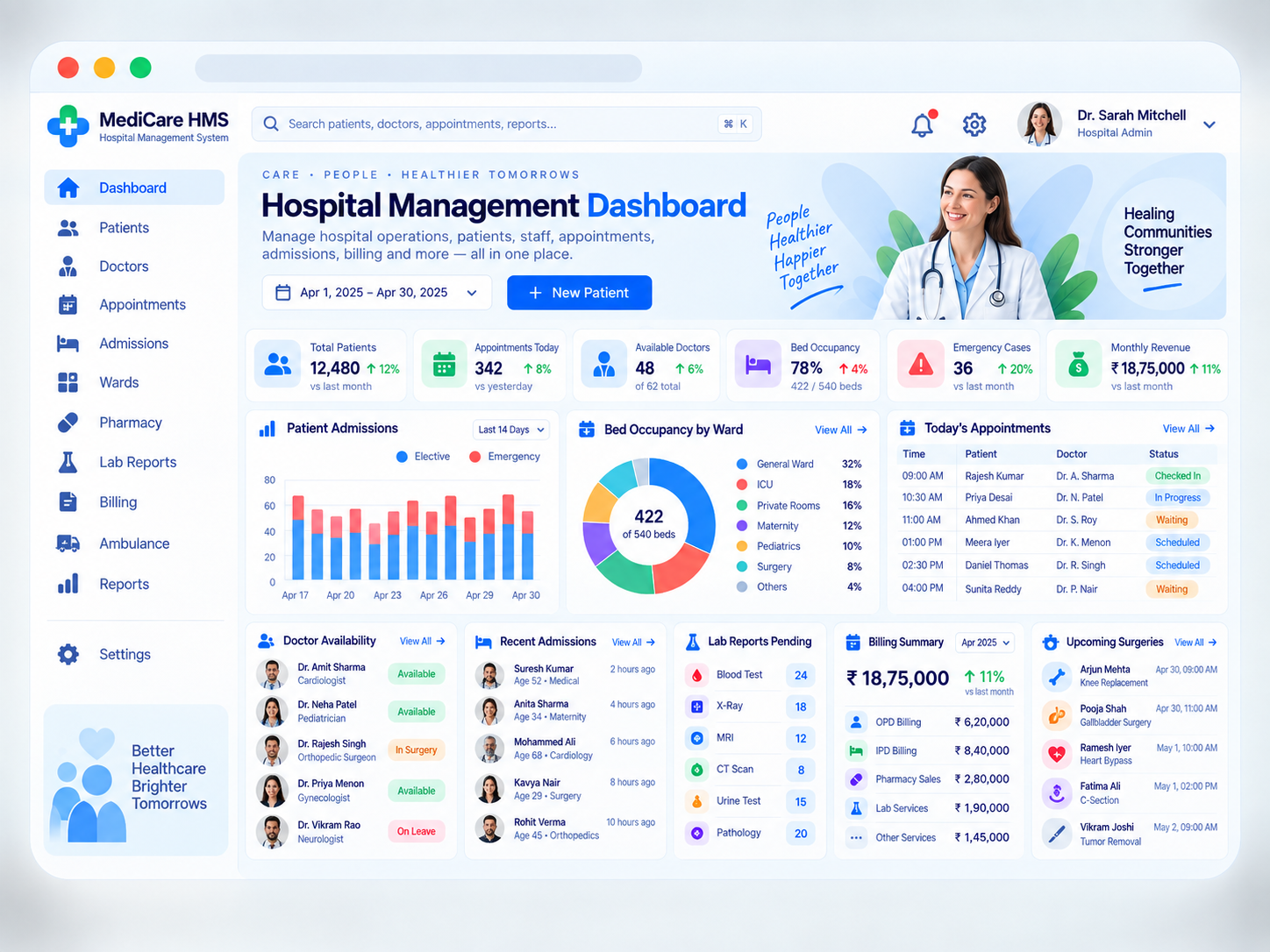
The hospital management system connects front desk, clinical departments, inpatient operations, and finance in one coordinated workflow for more efficient hospital administration.
Explore the workspaces, everyday actions, and reporting behind this solution. Each module below explains what your team can manage and how the work connects.
02 / Features & functionality
Inside each module
9 modules ? Detailed walkthrough
01Module guide
Hospital dashboard & daily operations
The header dashboard brings patient volume, today's appointments, doctor availability, bed occupancy, emergency cases, and revenue into one operational view. Administrators can identify busy departments and pending work before opening individual records.
Hospital activity. Review patient totals, appointment counts, emergency activity, and admissions for a selected period, with comparisons that show changes in demand.
Capacity at a glance. Read occupancy by ward and doctor availability together to help coordinate admissions and appointment schedules.
Pending work. Follow recent admissions, outstanding laboratory reports, billing activity, and upcoming surgeries from the dashboard's operational panels.
Example in practice
An administrator sees high ward occupancy and several planned admissions, checks available beds, and coordinates with the admissions and ward teams before assigning rooms.
02Module guide
Patient registration & records
The Patients section maintains a consistent identity for each patient across appointments, admissions, diagnostics, and billing. Front-desk staff can find an existing patient before creating a new record and carry that identity through subsequent visits.
Registration details. Record demographics, contact information, emergency contacts, and a patient reference so each visit can be linked to the right person.
Visit history. Connect outpatient appointments, inpatient admissions, relevant documents, and previous service records to the patient's profile.
Authorised access. Make patient information available according to staff responsibilities, with changes traceable to the person who made them.
03Module guide
Appointments, doctors & schedules
The Appointments and Doctors workspaces connect patient bookings with department schedules and provider availability. The daily appointment table makes it clear who is expected, who has arrived, and which consultations are underway.
Appointment booking. Select a department, doctor, and available time. Keep the visit reason and booking details associated with the patient record.
Queue status. Track scheduled, checked-in, waiting, in-progress, and completed visits so the reception and clinical teams share the same queue information.
Doctor availability. Distinguish available doctors from those in consultation, in surgery, or on leave, and coordinate rescheduling when availability changes.
04Module guide
Admissions, wards & bed management
The Admissions and Wards sections track the inpatient journey from admission to discharge. Staff can see the current ward, assigned bed, treating team, and transfer status without relying on separate departmental lists.
Admission record. Capture admission type, department, treating doctor, and the information required for the inpatient stay.
Bed allocation. Review bed availability by ward, including general wards, ICU, private rooms, and other hospital units. Record assignments and transfers against the admission.
Discharge coordination. Bring the required departmental work, documentation, and billing follow-up together before completing discharge and updating bed availability.
Stages explained
1
Registered
The patient record and admission request are prepared.
2
Admitted
A ward, bed, and treating team are assigned.
3
Under care
Teams coordinate services, ward activity, and any transfers.
4
Discharged
The stay is closed and bed status is updated after handover.
05Module guide
Pharmacy & medicine operations
The Pharmacy section connects medicine requests and dispensing to patient care and hospital billing. Pharmacy staff can follow what was requested, what was supplied, and how the transaction affects available stock.
Prescription workflow. Review medicine requests against the patient and encounter before recording dispensing activity.
Stock and expiry visibility. Track medicine availability, batches, and expiry information to support replenishment and responsible stock handling.
Patient charges. Connect dispensed items and their charges to the relevant outpatient visit or inpatient admission so finance has the supporting detail.
06Module guide
Laboratory orders & reports
Lab Reports gives staff a clear view of requested tests, work in progress, and results awaiting review. The pending-report panel in the dashboard helps departments spot unfinished diagnostic work without searching each patient individually.
Test requests. Associate each diagnostic order with the patient, requesting team, and required test information.
Processing status. Follow collection, processing, and review status so teams can distinguish pending work from completed results.
Reviewed results. Make authorised reports available against the patient record and keep the report history accessible for subsequent care coordination.
07Module guide
Billing, payments & revenue
The Billing workspace combines charges from hospital services into understandable patient accounts. The dashboard separates outpatient, inpatient, pharmacy, laboratory, and other revenue so administrators can see which services contribute to collections.
Service-wise charges. Connect consultations, room charges, diagnostic tests, pharmacy items, and other services to the correct visit or admission.
Invoices and receipts. Review bill items, record approved adjustments and payments, and keep a history of receipts and outstanding balances.
Revenue breakdown. Compare billing and collection information by service and period, then investigate unpaid amounts or discrepancies at the patient-account level.
08Module guide
Emergency, ambulance & surgery coordination
Emergency indicators, the Ambulance workspace, and the upcoming-surgeries panel help hospital teams coordinate time-sensitive operational work. They keep requests, resources, and scheduled activity visible to the people responsible for arranging them.
Emergency registration. Identify emergency arrivals and make their operational status visible to the appropriate hospital teams.
Ambulance requests. Organise transport requests, vehicle assignment, pickup details, and trip status so the dispatch team can follow each request.
Surgery schedule. Keep planned procedures, patient references, responsible teams, and scheduled times together to support theatre coordination.
09Module guide
Reports, staff access & settings
Reports turn hospital activity into information administrators can review over time. Settings and staff access controls support the different responsibilities of reception, doctors, ward staff, pharmacy, laboratory, and finance teams.
Operational reports. Review admissions, appointments, occupancy, and pending diagnostic work by date range and department.
Finance reports. Compare service-wise billing, collections, and outstanding amounts to support management reviews and reconciliation.
Department responsibilities. Define staff roles and permitted actions so each team can maintain the records needed for its work.
03 / From start to finish
How it all comes together.
Hospital operations suite for departments, admissions, beds, billing, and staff.
The project workflowA representative journey, step by step
Step 01
Register & schedule
Find or create the patient record and arrange the required appointment or admission.
Step 02
Coordinate care
Assign the relevant doctor, department, and bed when an inpatient stay is needed.
Step 03
Connect services
Follow laboratory work, pharmacy requests, and departmental updates against the patient record.
Step 04
Complete & review
Coordinate billing, discharge or visit completion, and operational reporting.
Each stage connects the people, information, and actions needed for the next step.