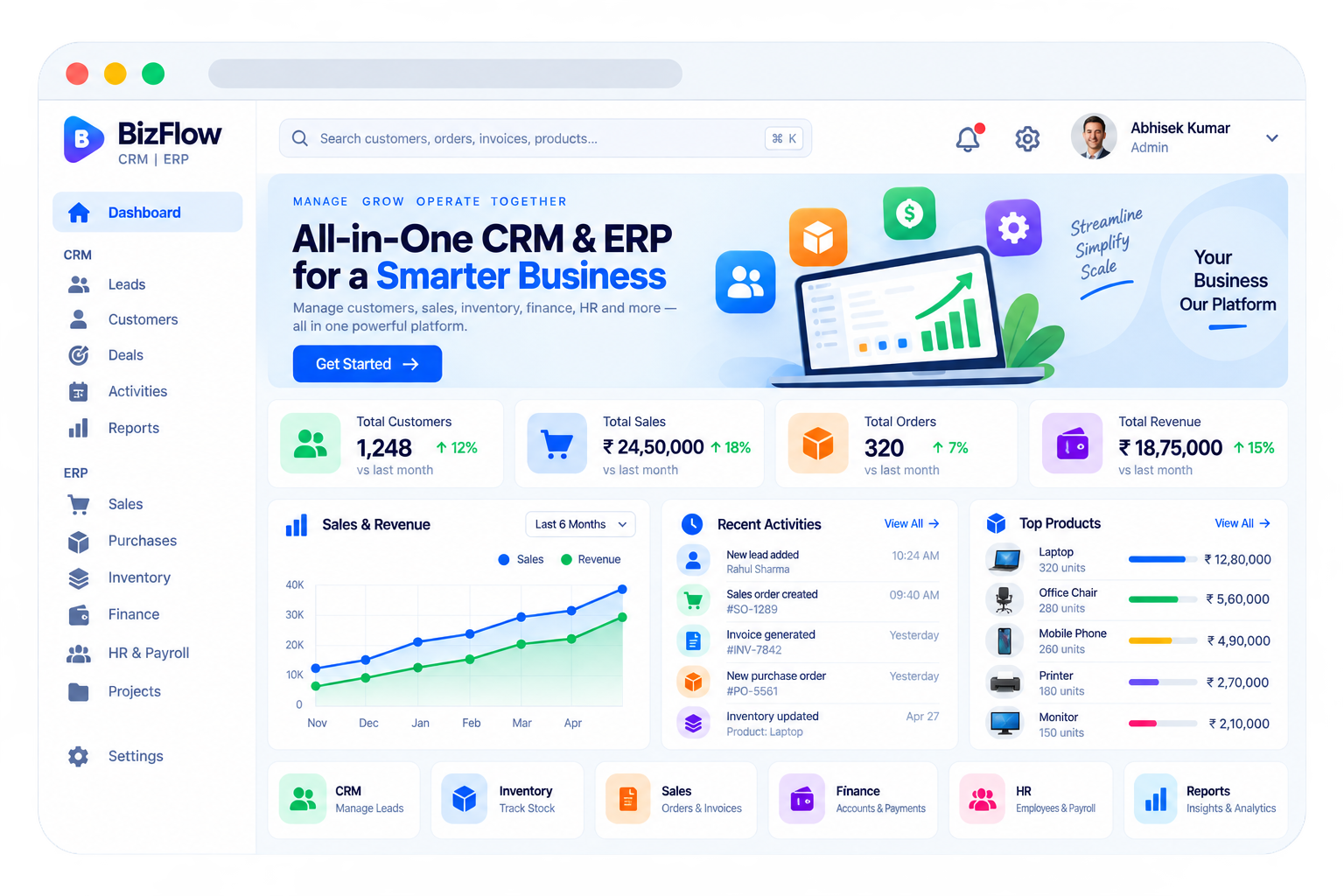
The platform connected sales pipelines, service workflows, and operational dashboards into one system. Teams gained a clean view of customer activity and transaction data without switching between disconnected tools.
Explore the workspaces, everyday actions, and reporting behind this solution. Each module below explains what your team can manage and how the work connects.
02 / Features & functionality
Inside each module
9 modules ? Detailed walkthrough
01Module guide
Lead management & sales stages
The Leads workspace follows every enquiry from its first contact to a sales decision. Each lead has an owner, a source, a current stage, and a next action, so the sales team knows exactly who needs attention and why.
Lead capture. Bring website enquiries, campaign responses, referrals, and manually added contacts into a single list. Record the source, product interest, contact details, and enquiry date.
Assignment and prioritisation. Assign leads to sales representatives, identify promising opportunities, and filter the list by owner, source, stage, or overdue follow-up.
Complete activity history. Keep calls, emails, meeting notes, and follow-up dates against the lead. A new representative can understand the conversation before contacting the customer.
Stages explained
1
New
An enquiry arrives and is assigned to a representative.
2
Contacted
The representative makes contact and records the initial requirement.
3
Qualified
The team confirms the need, budget, and expected buying timeline.
4
Proposal
A quotation or proposal is shared with the decision-maker.
5
Negotiation
Pricing, scope, and commercial terms are discussed.
6
Won / Lost
Record the decision, create the customer handover, or capture the reason for loss.
Example in practice
A website enquiry for 50 product licences is assigned to a salesperson, qualified after a call, sent a quotation, and moved to Won once the customer accepts. The contact and conversation history continue into the customer record.
02Module guide
Customer & contact management
The Customers workspace gives sales, finance, and support a shared view of each account. Instead of separate lists, the team works from one customer profile that connects people, purchases, conversations, and outstanding requests.
Customer profiles. Store company details, billing and delivery addresses, primary contacts, account ownership, and relevant notes in one searchable record.
Relationship history. Connect earlier leads, active deals, quotations, orders, invoices, and support conversations to the same customer.
Segments and account ownership. Group customers by industry, location, purchase activity, or account status. Give each account a responsible team member for ongoing follow-up.
Example in practice
Before a renewal call, an account manager can review the customer's last purchase, unpaid invoice, and unresolved support request from the same profile.
03Module guide
Deals, quotations & sales orders
The Deals and Sales sections turn a qualified opportunity into a structured commercial transaction. Teams can see what is being sold, its expected value, who is responsible, and what needs to happen before the deal closes.
Deal tracking. Record opportunity value, expected closing date, products or services, and decision-makers. Review open deals by salesperson and stage.
Quotation preparation. Organise line items, quantities, pricing, discounts, and commercial notes so proposals are consistent and easy to review.
Sales handover. Carry accepted deal details into order and invoice workflows, keeping the customer and agreed scope connected as operations take over.
04Module guide
Activities, tasks & follow-ups
The Activities workspace turns customer conversations into a practical daily worklist. Representatives can plan calls and meetings, track commitments, and make sure a promising lead does not disappear after the first interaction.
Daily task list. Organise calls, meetings, demonstrations, and follow-up tasks by owner, due date, priority, and completion status.
Contextual reminders. Link every reminder to the relevant lead, customer, or deal so the team knows what the task is about before opening it.
Manager visibility. Identify overdue follow-ups, review completed activities, and reassign work when a team member is unavailable.
05Module guide
Business dashboard
The dashboard in the header brings customers, sales, orders, and revenue into one overview. It helps managers answer two questions quickly: how is the business performing, and what needs attention today?
Headline metrics. View customer totals, sales value, order volume, and revenue for the selected period. Compare periods to understand whether activity is increasing or slowing.
Sales and revenue trends. Read the time-based chart to spot strong periods, quieter months, and changes that need investigation.
Recent activity and top products. Follow new leads, completed sales, payments, and inventory updates, alongside the products contributing most to sales.
Example in practice
A manager notices sales rising while revenue collection is flat, then opens finance reports to check whether recent customer invoices are still unpaid.
06Module guide
Reports & business analytics
Reports explain the numbers behind the dashboard. Teams can review performance by period, salesperson, customer, or product and use the results to improve sales planning, customer follow-up, and business operations.
Lead and conversion reports. Compare lead sources, stage movement, won and lost opportunities, and loss reasons to see where the sales process needs improvement.
Sales and customer reports. Review sales by product, representative, and customer segment. Identify repeat buyers, high-value accounts, and weaker sales areas.
Operational and finance reports. Follow orders, stock availability, outstanding invoices, and collections. Use filtered exports for internal reviews and management reporting.
07Module guide
Customer support & service requests
Support extends the customer relationship after the sale. A service request stays connected to the customer and their purchase history, giving the support team enough context to respond without asking the customer to repeat everything.
Ticket intake. Record the customer's question or issue, related order, category, priority, and supporting notes or attachments.
Ownership and escalation. Assign a support agent, record a response target, and escalate unresolved issues to the appropriate team.
Resolution history. Keep the conversation, actions taken, and final resolution together. Reopen the request if the issue returns and review repeated problem categories.
Stages explained
1
Open
A new request is recorded and awaits assignment.
2
In progress
An assigned agent investigates and responds.
3
Awaiting reply
The team needs information from the customer or another department.
4
Resolved
The solution is documented and the request is closed after confirmation.
08Module guide
Inventory, purchases & finance
The ERP workspaces shown in the preview connect sales to stock, suppliers, and money movement. Once a deal becomes an order, the operations and finance teams can continue working with the same business information.
Inventory control. Maintain product records, quantities, stock movements, and replenishment needs. Check availability before committing stock to a customer order.
Supplier purchases. Organise supplier records and purchase orders, then follow incoming goods into inventory so the sales team can see updated availability.
Finance and collections. Connect invoices, payments, expenses, and outstanding balances to customer and supplier records for a clearer view of cash movement.
09Module guide
People, projects & administration
HR & Payroll, Projects, and Settings support the teams delivering the work. These workspaces connect internal responsibilities with customer commitments while controlling who can view or change business information.
People operations. Maintain employee details and organise attendance and payroll inputs so workforce administration sits alongside the wider business workflow.
Project delivery. Organise customer work into projects, tasks, responsible team members, and due dates. Follow delivery progress after the sales handover.
Access and preferences. Define team roles, access permissions, and business settings so sales, support, operations, and finance have the appropriate workspace.
03 / From start to finish
How it all comes together.
Unified customer, sales, and operations platform for growing businesses.
The project workflowA representative journey, step by step
Step 01
Capture & qualify
Record the enquiry, assign an owner, and confirm the customer's requirements.
Step 02
Propose & close
Prepare the offer, follow negotiations, and record the sales decision.
Step 03
Deliver & invoice
Hand over the order to operations and connect delivery with billing.
Step 04
Support & grow
Resolve customer requests, review performance, and plan the next opportunity.
Each stage connects the people, information, and actions needed for the next step.