
Skip to content

Book a free consultation today!

Quanlyx
All projects
FinTech / Project spotlight

POS Software System

Point-of-sale system for payments, transactions, inventory, and reporting.

POSPaymentsInventory
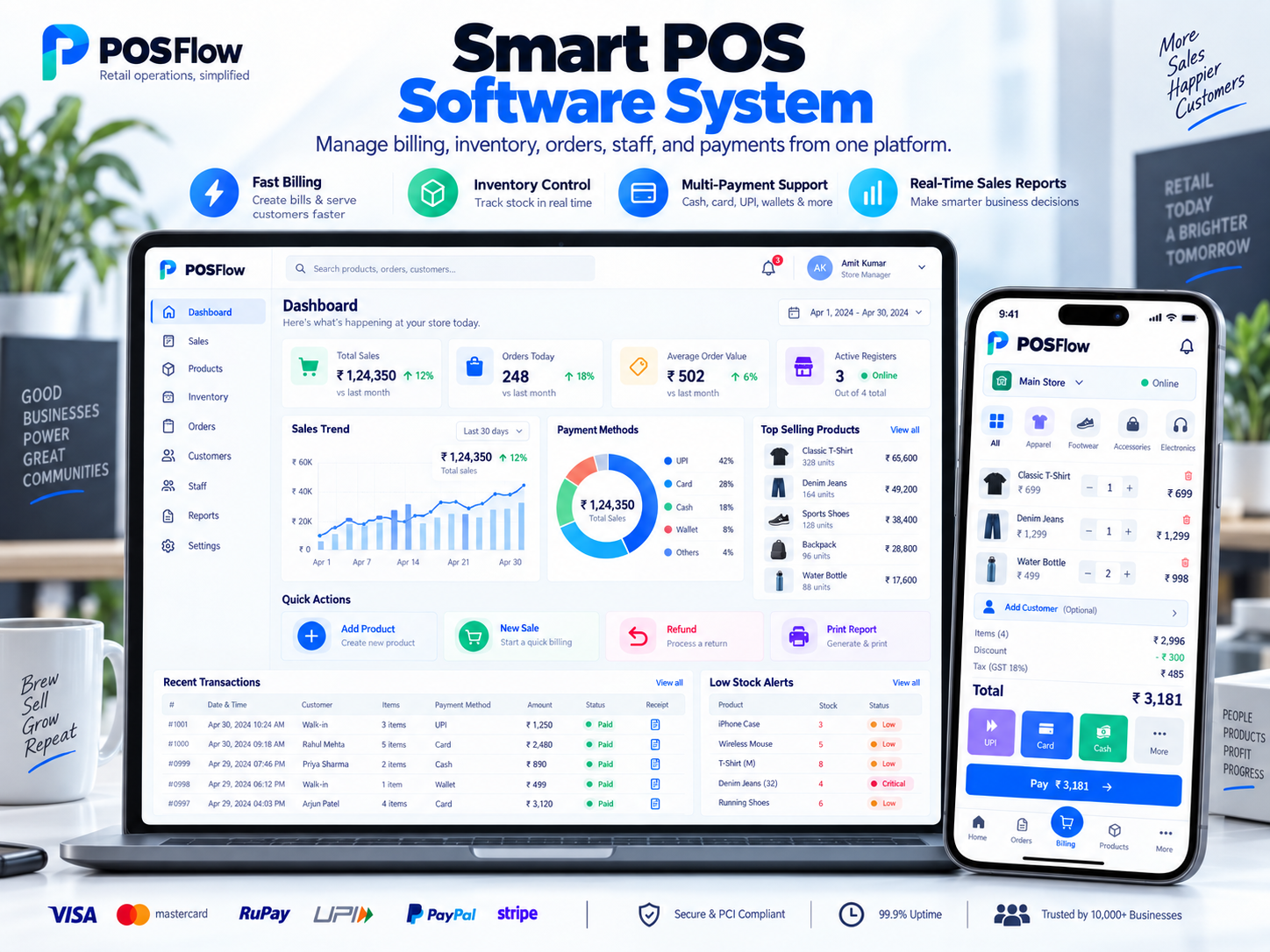
POS Software System: Point of sale interface illustration
Point of saleIllustrative preview

01 / Product walkthrough

Point of sale, explained in detail.

The POS system helps businesses process sales, manage products, track inventory, and monitor revenue across locations and payment channels.

Explore the workspaces, everyday actions, and reporting behind this solution. Each module below explains what your team can manage and how the work connects.

02 / Features & functionality

Inside each module

8 modules ? Detailed walkthrough
01Module guide

Barcode and product search

Find items by barcode or search and add them to the current sale without navigating away from checkout.

  • Product lookup. Find an item using its barcode, name, or product reference and check price and availability before adding it to the sale.

  • Cart accuracy. Review the selected variant, quantity, and line total with the cashier so a similar product is not sold by mistake.

02Module guide

Offline checkout queue

Queue checkout activity during connectivity interruptions and synchronise it when the connection returns.

  • Pending transactions. Keep locally queued sales distinguishable from transactions already synchronised with the central system.

  • Connection recovery. Reconcile queued activity when connectivity returns and surface items requiring attention rather than silently creating duplicate sales.

03Module guide

Split tender payments

Split a purchase across supported payment methods while keeping a single transaction record.

  • Payment allocation. Divide the amount due across supported methods, recording each payment and the remaining balance.

  • Transaction record. Keep all payment parts associated with the same receipt so returns and reconciliation can refer to the original sale.

04Module guide

Returns and exchanges

Process returned items, exchanges, and the related payment and stock adjustments.

  • Original-sale reference. Find the purchased item and review the quantity and payment details before recording a return.

  • Stock and payment adjustments. Connect the accepted return or replacement to the corresponding inventory movement and refund or balance due.

05Module guide

Multi-store inventory

Track stock availability, transfers, and low-stock conditions across store locations.

  • Store availability. Review stock by location so staff can identify where an item is available and whether replenishment is needed.

  • Transfers and receipts. Track items moving between stores and update the receiving location after the transfer is confirmed.

06Module guide

Cash drawer and shift control

Manage staff shifts, cash drawers, and end-of-day reconciliation.

  • Shift ownership. Associate the active checkout session and cash drawer with the responsible staff member.

  • Closing reconciliation. Compare expected cash with the closing count and record discrepancies for manager review.

07Module guide

Tax and discount rules

Apply tax and discount rules consistently during checkout, with approvals where required.

  • Consistent calculations. Apply the configured tax treatment and eligible discounts to the current sale.

  • Approvals and visibility. Keep applied discounts visible on the transaction and route exceptions through the store's approval process.

08Module guide

Sales and settlement reports

Review sales and payment settlements to reconcile daily store activity.

  • Sales breakdown. Review sales by period, location, product, or payment method to understand store activity.

  • Settlement matching. Compare recorded payments with provider settlements and identify differences that need reconciliation.

03 / From start to finish

How it all comes together.

A resilient checkout and operations system that keeps sales, stock, payments, and settlement data consistent across locations.

The project workflowA representative journey, step by step
  1. Step 01

    Cashier terminal

    Cart, discounts, receipts, offline queue

  2. Step 02

    POS API

    Order validation, tax, pricing, permissions

  3. Step 03

    Payment orchestration

    Cards, wallets, refunds, retries

  4. Step 04

    Operations data

    Inventory, shifts, settlements, reports

Each stage connects the people, information, and actions needed for the next step.

Reliability

Idempotent transactions and an offline-first queue prevent duplicate sales.

Security

Role-based access, tokenised payment data, audit events, and encrypted transport.

Your next project starts here

Have something similar in mind?

Let’s turn your requirements into a clear, practical solution for your business.

Talk to our team