
Skip to content

Book a free consultation today!

Quanlyx
All projects
Healthcare / Project spotlight

Healthcare Patient Booking

Appointment booking experience for patients, providers, and healthcare facilities.

AppointmentsSchedulingReminders
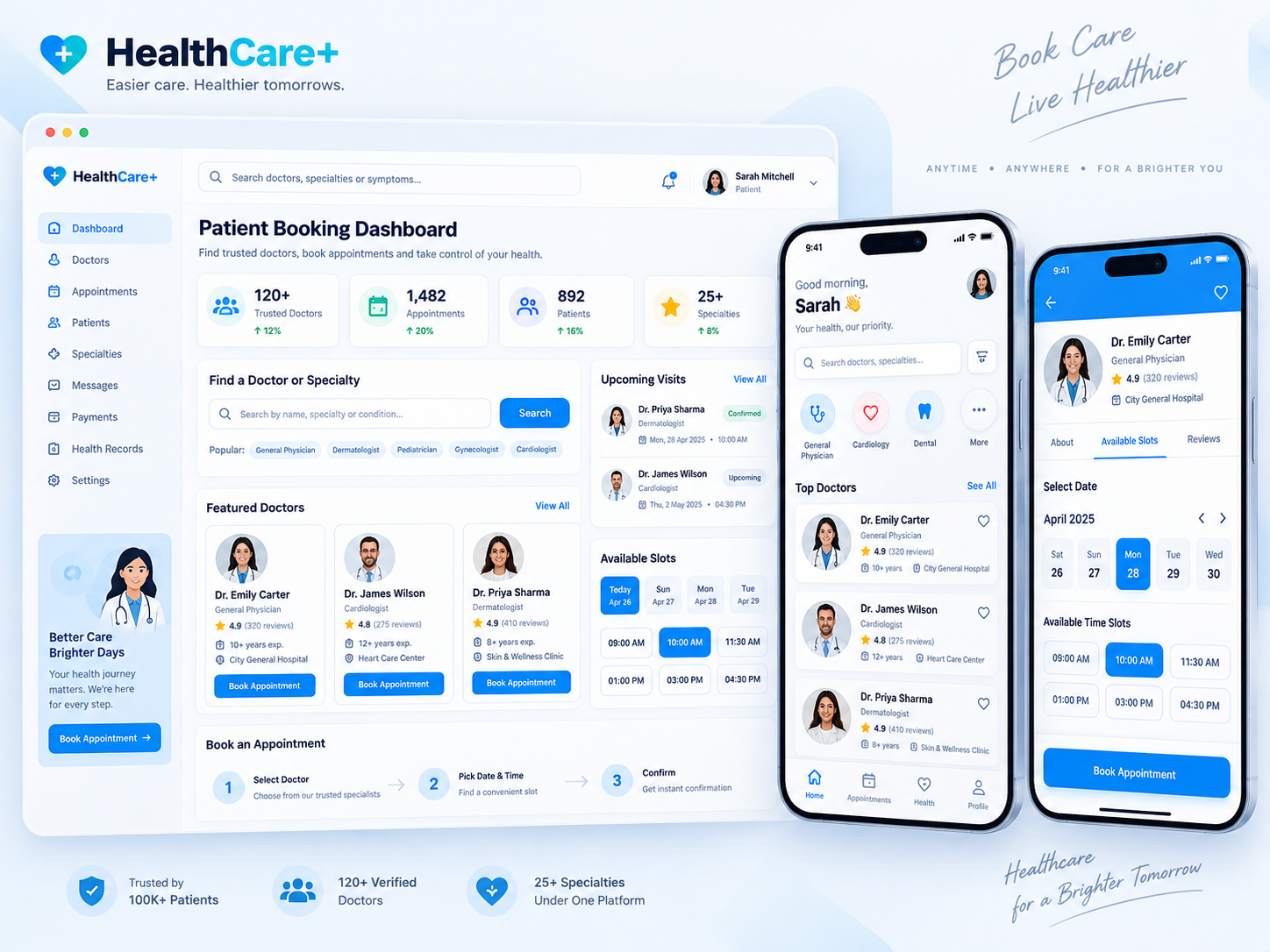
Healthcare Patient Booking: Patient booking interface illustration
Patient bookingIllustrative preview

01 / Product walkthrough

Patient booking, explained in detail.

Patients can find providers, choose available time slots, receive reminders, and manage appointments while clinics maintain a clear schedule across departments.

Explore the workspaces, everyday actions, and reporting behind this solution. Each module below explains what your team can manage and how the work connects.

02 / Features & functionality

Inside each module

5 modules ? Detailed walkthrough
01Module guide

Provider discovery

Help patients find a provider and review the available appointment options.

  • Provider information. Present the doctor's specialty, location, and available services so patients can choose a relevant appointment.

  • Appointment options. Keep the selected provider connected to their schedule rather than asking patients to start a separate booking enquiry.

02Module guide

Time-slot selection

Show available slots so patients can select a convenient appointment across departments.

  • Availability view. Display appointment dates and times for the selected provider and location.

  • Booking confirmation. Recheck the chosen time before confirming the appointment so changes in the schedule can be handled clearly.

03Module guide

Appointment management

Keep booking details and schedule changes in one place for patients and clinic staff.

  • Booking record. Keep the patient, provider, visit reason, date, and current appointment status in one record.

  • Schedule changes. Support rescheduling and cancellation with clear updated details for both the patient and clinic staff.

04Module guide

Appointment reminders

Send timely appointment reminders to help patients prepare and reduce missed visits.

  • Timely notifications. Remind patients about the appointment time, location, and any administrative preparation details.

  • Updated information. Connect reminders to the current booking details so a changed or cancelled appointment does not create conflicting instructions.

05Module guide

Clinic scheduling

Give staff a clear view of provider schedules and upcoming appointments.

  • Daily calendar. Review bookings by provider or department and distinguish available slots from confirmed appointments.

  • Front-desk coordination. Track arrivals and changes so staff can answer scheduling questions with current information.

03 / From start to finish

How it all comes together.

Appointment booking experience for patients, providers, and healthcare facilities.

The project workflowA representative journey, step by step
  1. Step 01

    Provider discovery

    Help patients find a provider and review the available appointment options.

  2. Step 02

    Time-slot selection

    Show available slots so patients can select a convenient appointment across departments.

  3. Step 03

    Appointment management

    Keep booking details and schedule changes in one place for patients and clinic staff.

  4. Step 04

    Appointment reminders

    Send timely appointment reminders to help patients prepare and reduce missed visits.

Each stage connects the people, information, and actions needed for the next step.

Your next project starts here

Have something similar in mind?

Let’s turn your requirements into a clear, practical solution for your business.

Talk to our team